


Description
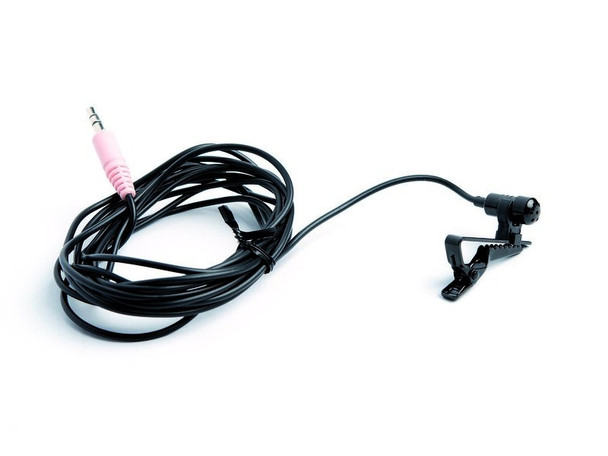
The SimPad External Microphone is the clip-on microphone that plugs into the SimPad link box. Placed with the action, it captures the voices and sounds of the scenario for the session record and the debrief that follows.
SimPad External Microphone: Hear the Room, Run the Scenario
Debrief quality depends on hearing what was said and done in the room, and a microphone at the control point often misses the action at the manikin. This external microphone clips on where the work happens and plugs into the SimPad link box. It is a genuine Laerdal accessory for SimPad based simulator setups. The microphone is a small part of the session kit, and it is easy to lose, which makes a spare worth stocking. This listing is the microphone only, and the link box and SimPad are separate components.
Features and Benefits
- Clip-on format: places the microphone with the learner or the manikin
- Link box connection: plugs into the SimPad link box for the session audio path
- Genuine Laerdal accessory: made for the SimPad simulator ecosystem
- Small and light: adds no meaningful bulk to the simulator kit
- Session audio: supports debrief quality by capturing the room clearly
Product Specifications
Product
- Product type: External clip-on microphone, accessory
- Connection: Plugs into the SimPad link box
- System: Laerdal SimPad simulator setups
Contents
- In the box: Clip-on external microphone. Link box sold separately
Browse more simulation gear in Educational Supplies or shop the full Laerdal Medical range at MedicalEx.
Why Choose the SimPad External Microphone?
Simulation value concentrates in the debrief, and the debrief depends on hearing the session. This microphone is the small accessory that protects that value.
- Better room audio makes debriefs specific instead of general
- Clip-on placement puts the microphone at the manikin, not the desk
- A stocked spare prevents a lost mic degrading every session
Frequently Asked Questions
What does the microphone do?
It is a clip-on external microphone for the SimPad link box, picking up sound from the training room for the simulation session.
How does it connect?
The microphone clips on and plugs into the SimPad link box.
Which system does it serve?
It serves SimPad based Laerdal simulator setups that use the link box.
Is the link box included?
No. This is the external microphone only, and the link box and SimPad are separate system components.
Why use an external microphone?
An external mic placed with the action captures voices and sounds that a built in microphone at the control point can miss.